
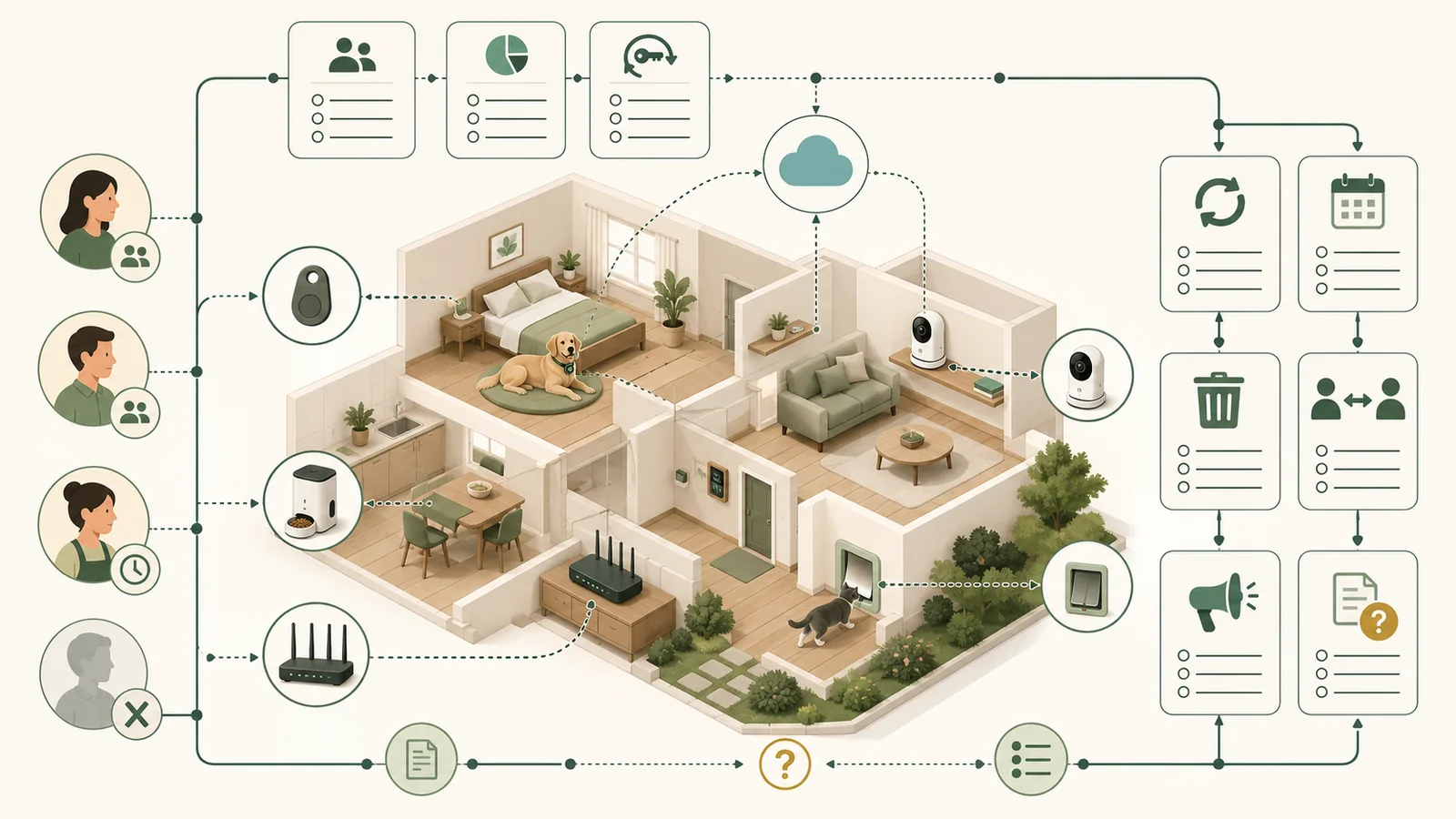
Quick answer
Before connecting a pet tracker, camera, feeder, door, collar, or cloud service, identify the full product ecosystem-not only the physical device. Then verify what sensitive data it handles, who can access it, whether strong account controls exist, how household access is revoked, how updates arrive, how long security support is promised, where vulnerabilities are reported, and how data and ownership are removed.
A privacy policy or security page is evidence, not a security verdict. Missing, partial, stale, or conflicting documentation should remain visible; it should not be converted into a pass.
Key facts
Swipe horizontally to see all columns.
| Question | Evidence-safe answer |
|---|---|
| Is the device the whole product? | No. The app, cloud service, account, network path, household sharing, support process, and subscription may be part of the security and privacy boundary. |
| Does a privacy policy prove security? | No. It can describe data practices while leaving authentication, update, support, vulnerability, and implementation questions unresolved. |
| Is MFA enough? | No. It is an important account control, but recovery, shared access, permissions, updates, and data handling still matter. |
| Does a current sale page prove future support? | No. Look for an exact minimum security-support date or a clear unsupported statement for the exact model. |
| Does account deletion cancel billing? | Not necessarily. Deletion, subscription cancellation, app removal, and device reset can be separate actions. |
| Does this checklist rate products? | No. It screens documentation and preserves evidence gaps; it does not certify, score, rank, or recommend a product. |
A useful result is a documented control plus its exact scope, date, model, and limitation-not a reassuring label without evidence.
This checklist is suitable for
- Households considering a connected tracker, camera, feeder, collar, door, sensor, or pet app.
- Buyers who want to compare documentation before creating an account or connecting a device.
- Existing owners reviewing household access, updates, support, deletion, or transfer.
Use a different review path if
- You need penetration testing, source-code review, packet capture, exploit analysis, or incident forensics.
- You need a legal or regulatory compliance opinion.
- You need a guarantee that a product is secure, private, safe, or breach-proof.
Define the full product system
A connected pet product can span hardware, firmware, a mobile app, a web account, cloud processing, Wi-Fi or cellular service, a camera or microphone, household invitations, a subscription, and support or deletion workflows. NIST’s consumer-IoT profile treats cybersecurity outcomes as product-wide, which is a useful warning against reviewing only the object attached to a collar or sitting in a room.
Write down the exact device model, app name, account type, hub or base, service plan, required network, and every person who can see or control it. A sibling model, different app, or regional service can have a different support or privacy record.
Map data, purpose, sharing, and public visibility
Start with the data that could matter if the account, device, vendor, or household-sharing setup fails. Read the privacy policy, in-app controls, public-profile documentation, and data-request instructions together.
The table is a screening aid, not an incident forecast. No probability or prevalence was established; each likelihood statement stays conditional on the exact product, settings, roles, and current implementation.
Swipe horizontally to see all columns.
| Risk | Evidence to inspect | Likelihood statement | Potential consequence | Mitigation | Residual unknown |
|---|---|---|---|---|---|
| Precise or recent location is visible beyond the intended people | Current privacy policy, role definitions, sharing controls, retention, export, public-profile, and revocation documentation. | Not estimated; exposure depends on whether location is collected, the current defaults, assigned roles, sharing, and account control. | Another person may be able to view or retain location and routine information outside the intended household workflow. | Limit roles, verify visibility and retention, secure recovery channels, and test revocation before relying on sharing. | Current defaults, session invalidation, app-version behavior, and backend retention were not tested. |
| Audio or video is viewed, recorded, downloaded, or shared outside the intended workflow | Live-view, recording, storage, clip-sharing, household-role, recovery, and deletion documentation. | Not estimated; the possibility depends on the exact camera, storage mode, account controls, and people with access. | Household audio, video, routines, or room activity may become available to an unintended viewer. | Choose the minimum required recording mode, restrict sharing, enable approved account protections, and verify deletion and transfer steps. | Camera, cloud, app, account, and deletion behavior were not tested. |
| Account or household access persists after it is no longer needed | Invitation, role, recovery, session, device-removal, member-removal, and account-deletion documentation. | Not estimated; persistence depends on the platform’s current role and revocation implementation. | A former member or uncontrolled recovery route may retain access to device, pet, location, or household information. | Use unique credentials, verify multifactor authentication where available, remove unused members and sessions, and recheck recovery ownership. | No household account, recovery route, session list, or revocation flow was tested. |
| Pet profile or derived activity is treated as more authoritative than the evidence allows | Feature definition, input data, inference wording, sharing, retention, export, and deletion documentation. | Not estimated; the risk depends on which fields the exact product generates and how the household interprets them. | An unverified activity or health-adjacent label may influence a decision beyond what the product documentation or evidence establishes. | Treat derived fields as product outputs, not medical findings; verify necessity, visibility, retention, and deletion. | Detection accuracy, clinical validity, household interpretation, and product necessity were not established. |
| Advertising, partner, or public-profile settings disclose more than the buyer expects | Current privacy policy, advertising controls, partner disclosures, sale-or-sharing controls, and public-profile documentation. | Not estimated; availability and defaults can vary by jurisdiction, account type, product, and app version. | Pet, account, device, activity, or profile information may be disclosed or made visible outside the buyer’s intended use. | Review the exact controls before connecting the product, disable unnecessary public features, and revisit settings after material updates. | Implementation, current defaults, downstream handling, and every jurisdiction-specific option were not audited. |
Fi’s social-feature documentation is a narrow example: it describes community sharing and an owner option to disable social features. Life360’s privacy center is another narrow example of account-facing controls. Neither example proves the defaults or options for another platform.
Verify authentication, recovery, and session control
For an account that can expose location, audio, video, or household access, check whether MFA or two-step verification is available, whether it is optional or enforced, which recovery channels can reset the account, and whether existing sessions or devices can be reviewed and removed.
CISA recommends MFA as an extra layer beyond a password. FTC guidance also supports strong unique passwords, software updates, and phishing awareness. These are household controls, not proof that a vendor’s account system is resistant to every attack.
Check household sharing and revocation before inviting anyone
Shared access is useful, but “family” or “household” is not a precise permission model. Record what each role can see and change, how an invitation is accepted, whether location or camera history is exposed, and how access is revoked after a sitter, roommate, employee, or former household member no longer needs it.
Swipe horizontally to see all columns.
| Access question | Evidence to find | Do not assume |
|---|---|---|
| Role scope | Owner, administrator, member, guest, sitter, viewer, or equivalent current definitions. | Every invited person has the same permissions. |
| Sensitive visibility | Live location, history, video, audio, routines, addresses, pet profile, and account details. | A limited label means limited data access. |
| Revocation | Documented removal flow, session invalidation, device removal, and password-change effects. | Deleting a contact or message removes platform access. |
| Recovery authority | Who controls the recovery email, phone, backup codes, or support verification. | The person who bought the hardware always controls the account. |
A household-sharing label is not enough. Verify what each role can see, change, recover, and revoke before granting access.
For a camera-specific owner, recovery, router, sharing, privacy-state, retention, incident, and offboarding workflow, use How to Secure a Pet Camera and Its Household Account.
Secure the initial setup and the network it depends on
Before connecting the product, find instructions for changing default credentials, choosing privacy settings, updating firmware, and securing the home router. FTC guidance recommends changing default router administrator credentials, using current Wi-Fi protection such as WPA3 or WPA2 where supported, and keeping router software current.
Also record whether the product needs Wi-Fi, cellular service, Bluetooth, a local hub, cloud access, or inbound router exposure. Do not open router ports or disable network protections merely because a setup guide is unclear; resolve the exact vendor requirement first.
Public Wi-Fi is a separate context. A secure website or app connection reduces some risks, but it does not make every network, device, account, or recovery path trustworthy.
Find both the update mechanism and the minimum support period
An update page should answer how firmware, app, and security fixes arrive; whether installation is automatic or manual; whether the user can see the current version; and what happens after an update fails. A support-period page should answer a different question: until what date does the vendor promise to identify and correct critical vulnerabilities for the exact model?
Swipe horizontally to see all columns.
| Evidence field | Acceptable documentation | Insufficient shortcut |
|---|---|---|
| Update mechanism | Automatic/manual behavior, access route, version visibility, prerequisites, and failure handling. | “Receives updates” without a current process. |
| Minimum support period | An exact date or a clear unsupported statement bound to the exact model and market. | Current sale status, launch date, warranty, or app availability. |
| Security notices | Current notice, status, email, app, or support channel for material changes. | A general marketing newsletter. |
| End of support | What functionality, cloud service, data access, or safe-transfer path remains after support ends. | Assuming the device becomes harmless or useless immediately. |
Furbo publishes a model-scoped support statement that includes a stated minimum through 2028 for described camera products. Petcube publishes model- and geography-qualified support information in its vulnerability-disclosure record. Those examples show the field to look for; they do not establish support for every product from either vendor.
Find a public vulnerability-reporting route
A vulnerability-disclosure policy or security contact gives researchers and customers a defined place to report a potential flaw. Check the accepted scope, contact address or form, prohibited testing, safe-harbor language if any, acknowledgement expectations, and whether the exact product is covered.
Petcube publishes a vulnerability-disclosure policy and security contact. That is documentation evidence, not proof of report volume, remediation quality, or response speed. When no route appears in the reviewed sources, record not found; do not claim the vendor has no internal process or no vulnerabilities.
Review app permissions and incident information
Map each mobile permission to a feature. Camera, microphone, precise location, nearby devices, Bluetooth, local network, photos, notifications, contacts, and background activity can have different purposes. Check whether optional permissions can be denied and what feature stops working; this package did not test any permission flow.
Also look for a status page, security notices, app notifications, or another current channel for outages and material changes. “No incident found” in a small documentation sample is not evidence that no incident occurred.
Separate deletion, cancellation, reset, and ownership transfer
Before returning, replacing, selling, or discarding a connected pet product, identify every separate action. A missing step can leave billing active, data retained, a device linked, or another person able to access the account.
Swipe horizontally to see all columns.
| Action | Question to resolve | What it may not do |
|---|---|---|
| Remove the app | Does anything change on the account, cloud service, device, or subscription? | Delete account data or stop billing. |
| Cancel subscription | When does service end and what data or functionality remains? | Delete the account or erase the device. |
| Delete account/data | What is deleted, retained, verified, delayed, or irreversible? | Refund a prepaid term or unlink every physical component. |
| Reset and unlink | How are local data, Wi-Fi, tokens, owners, and cloud bindings removed? | Cancel billing or satisfy every legal retention request. |
| Transfer ownership | Can the new owner enroll the exact device, and what proof or release is required? | Automatically revoke every household member or backup session. |
Fi describes account deletion as irreversible and says a mid-term membership is not prorated through that flow. Life360 also separates account deletion from membership cancellation. Tractive uses an account-deletion flow with email confirmation. These are platform-specific examples, not a universal procedure.
Use voluntary labels and registries as evidence leads, not guarantees
Current FCC registry rules for products authorized to use the voluntary IoT Label include product identity, authorization status, secure-configuration instructions, update behavior, minimum support period, and other disclosures. A QR-linked record can make those fields easier to find.
The label does not replace checking the exact product, current authorization, household use, account controls, or future changes. A product without a reviewed label is not automatically insecure; a labeled product is not automatically secure for every scenario.
Worked documentation sample: four different evidence patterns
This sample demonstrates the checklist. It is not a market census, scorecard, ranking, recommendation, or security comparison.
Swipe horizontally to see all columns.
| Platform sample | Documentation found | Important buyer follow-up | What the evidence does not prove |
|---|---|---|---|
| Fi | Privacy policy, account-deletion instructions, and social-feature controls. | Verify current MFA/recovery, exact household roles, support date, vulnerability route, reset/transfer, and current app defaults. | Security implementation, deletion completeness, route privacy, or future support. |
| Life360 | Current privacy policy, privacy-center controls, and account-deletion instructions. | Verify current account controls, exact pet-tracker member permissions, support period, vulnerability route, and cancellation separately. | Security effectiveness, permission defaults, or complete data removal. |
| Furbo | Vendor security/two-step guidance and a model-scoped update-support statement. | Match the statement to the exact camera, market, app, account, retention, deletion, and transfer workflow. | Encryption implementation, attack resistance, or support beyond the stated scope. |
| Petcube | Privacy policy, vendor security page, and vulnerability-disclosure/support record. | Resolve the older privacy-policy date, exact model support, current account controls, permissions, retention, and transfer. | Current backend behavior, penetration resistance, or remediation outcomes. |
Different documentation depth is a reason to ask better questions, not enough evidence to declare a winner.
How the documentation screen handles gaps
Pet Signal Guide’s documentation screen, version 1.0.0, uses 16 controls. It returns:
- Stop: a critical control is conflicting, not found, or cannot legitimately be treated as applicable.
- Conditional: a critical answer is partial or a supporting question remains unresolved.
- Documentation ready: the source set answers all critical questions and every supporting control is documented or truly outside scope.
Checklist before you connect the product
- Record the exact model, app, account, hub, network, subscription, and household members.
- List location, audio, video, pet, household, diagnostic, advertising, and derived data that may apply.
- Find MFA or two-step options, recovery channels, session controls, and unique-password requirements.
- Document every household role, sensitive view, invitation path, and revocation step.
- Change default credentials and apply current router and secure-setup guidance.
- Find the firmware/app update mechanism and an exact minimum security-support date.
- Find a vulnerability-disclosure route or security contact for the exact product.
- Review mobile permissions and map each permission to a needed feature.
- Separate access/export, account deletion, subscription cancellation, reset, unlinking, and transfer.
- Record source dates and recheck after policy, app, model, support, or account-control changes.
What we could not verify
- whether any sampled platform’s current controls resist a real account, network, firmware, cloud, or social-engineering attack;
- whether vendor encryption or signed-update statements are implemented correctly in every component;
- actual MFA enforcement, recovery bypass, household-role behavior, session invalidation, or app-permission behavior;
- firmware-update success, failure recovery, security-notice timing, vulnerability-response quality, or remediation speed;
- complete backend retention, export, deletion, transfer, or disposal outcomes;
- a complete pet-tech market census, incident rate, vulnerability count, compliance status, or secure-product ranking.
Method
This checklist was researched for United States buyers using current government guidance, regulatory text, and direct vendor documentation checked through July 27, 2026. Material source-owner claims remain narrow and attributed. The worked sample was selected to demonstrate different documentation patterns, not because of commission, popularity, or a security verdict.
The original contribution is a versioned, reproducible documentation screen. Its retained validation suite includes 18 regression fixtures, 18 rejected invalid-input cases, 500 deterministic property cases, JSON Schema checks, repeated-output equality, control-order independence, and critical-gap invariants.
No product, account, app, network, firmware, permission, deletion, vulnerability, or incident workflow was tested. No specialist or legal reviewer assessed the page. Synthetic validation establishes only that the method handles declared evidence states consistently.
Sources
- National Institute of Standards and Technology: NIST Cybersecurity for IoT Program
- National Institute of Standards and Technology: Profile of the IoT Core Baseline for Consumer IoT Products (NIST IR 8425)
- National Institute of Standards and Technology: NIST IoT Cybersecurity Capabilities Catalog
- National Institute of Standards and Technology: IoT Non-Technical Supporting Capability Core Baseline (NIST IR 8259B)
- Federal Communications Commission / eCFR: 47 CFR 8.222 – Establishment of an IoT Registry
- National Institute of Standards and Technology: Cybersecurity Labeling for the Internet of Things
- Cybersecurity and Infrastructure Security Agency: Turn On MFA
- Cybersecurity and Infrastructure Security Agency: Secure Our World
- Federal Trade Commission: Protect Your Personal Information and Data
- Federal Trade Commission: How To Secure Your Home Wi-Fi Network
- Federal Trade Commission: Are Public Wi-Fi Networks Safe? What You Need To Know
- Fi: Fi Privacy Policy
- Fi: Delete a Fi account
- Fi: Social features
- Tractive: How to delete your account
- Life360: Life360 Privacy Policy
- Life360: Privacy Center
- Life360: Delete My Account
- Furbo: How Furbo Secures Your Privacy
- Furbo: Firmware and security update support
- Petcube: Privacy Policy
- Petcube: Vulnerability Disclosure Policy
- Petcube: Petcube Security